
The design-to-web pipeline has evolved rapidly, and the Figma to Framer workflow in 2026 has become one of the most efficient ways to build visually stunning, production-ready websites. With new AI upgrades, smarter imports, stronger interactions, and better collaboration, teams can now move from prototype to published website with minimal friction. This guide explores all the major improvements, enhanced workflows, and updated best practices for designers and developers aiming for a faster launch cycle.
Why Figma-to-Framer Has Become the Dominant Workflow in 2026
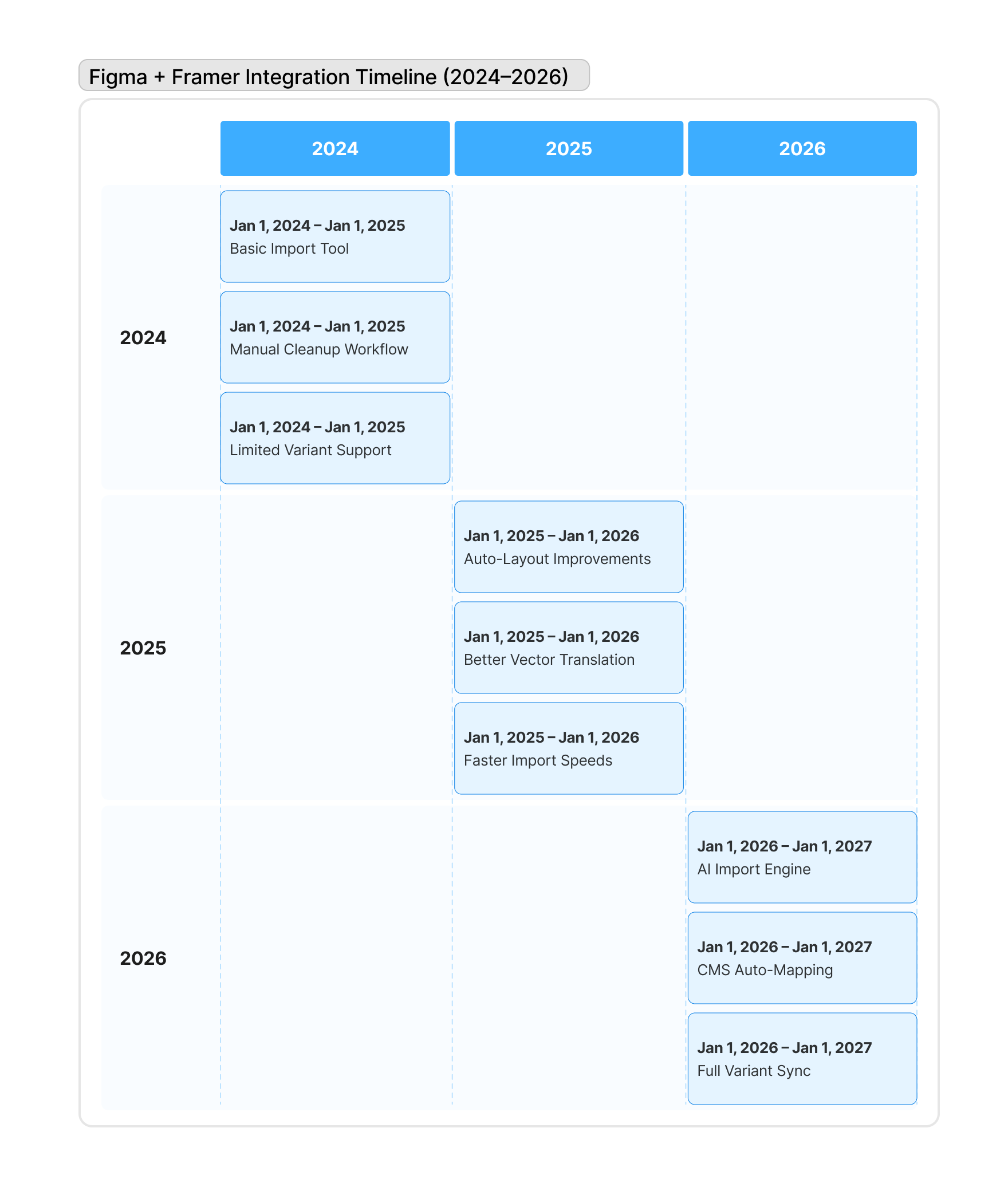
The Figma-to-Framer pipeline has surged in demand thanks to Framer’s improved fidelity, instant publishing, and new AI-assisted build tools. Designers love the seamless import experience, while developers appreciate the clean, responsive code output. In 2026, the ecosystem has matured to a point where prototypes convert into live, scalable pages without manual slicing, markup, or extended coding cycles.
The 2026 design ecosystem favors speed. Companies want websites deployed quickly without sacrificing visual quality, and Framer has positioned itself as the strongest no-code builder for design-first teams. Figma’s improved variable system, auto-layout precision, and native Dev Mode bridge perfectly with Framer’s layout engine.
The reason this workflow is now mainstream is simple: it shortens production time by nearly 70% for most teams. What used to take weeks in Webflow or custom coding is now achievable in days through a tight Figma–Framer integration.
New 2026 Import Engine — Cleaner, Faster, More Accurate
The new 2026 Framer Import Engine dramatically enhances layout detection, responsive accuracy, vector support, and component recognition. It reduces visual discrepancies and minimizes manual adjustments after import. Designers can confidently hand off pixel-perfect Figma frames knowing Framer will reproduce spacing, scaling, interactions, and typography exactly as the design intends.
Auto-Mapped Auto Layouts for Better Responsiveness
Auto Layout is more intelligent in 2026. When frames are imported into Framer, all padding, gaps, and direction rules transfer cleanly. Framer’s engine now detects breakpoints automatically and adjusts layout behaviors based on constraints defined inside Figma’s variables panel and auto-layout settings.
Auto Layout used to break frequently during export. Now, Framer recognizes even advanced stacking logic, container resizing, min/max constraints, and nested frames with proper hierarchy. Websites built with this system become responsive from day one, not after days of adjustments.
Improved Vector Translation & SVG Support
Figma’s vector network finally translates more smoothly to Framer’s canvas. Complex paths, icons, and decorative illustrations import cleanly as optimized SVGs. Designers no longer need to flatten assets or export manually. This results in sharper visuals and faster page loads.
This improvement helps illustrators, branding teams, and marketing pages deliver higher-quality graphics without extra export workflows.
Component States & Variants Import More Accurately
Figma Variants—including hover, pressed, filled, and animated states—are now mapped to Framer’s interaction system automatically. Buttons, toggles, dropdowns, and modals behave exactly as designed, without recreating interactions manually inside Framer.
Previously, designers had to rebuild state transitions after import. In 2026, variants become Framer components instantly.
AI-Powered Workflows That Transform the Speed of Building
Framer’s 2026 AI upgrades reshape the entire site-building workflow. Designers can import Figma frames and instantly generate responsive sections, optimized content, SEO copy, CMS collections, and working navigation. AI reduces repetitive tasks while giving developers more time to refine interactions and performance.
AI Layout Fix — Automatic Alignment & Cleanup
When imported designs contain inconsistent spacing or misaligned layers, Framer AI now fixes them with one click. It corrects padding, resolves overlapping elements, normalizes spacing, and converts frames into usable components.
This eliminates the common “Figma clutter problem” and ensures production-ready structure immediately.
AI CMS Mapping for Dynamic Content
A major 2026 update allows Framer AI to identify blog cards, product listings, team grids, or portfolios and automatically map them into CMS collections. Designers no longer have to define CMS fields manually. The import engine predicts the structure from Figma itself.
This dramatically speeds up blog setups, landing page templates, and commercial sites.
AI Section Generator for Faster Page Expansion
After importing a Figma design, teams can now ask Framer AI to generate matching sections—hero variations, testimonials, pricing grids, FAQs—using the same spacing rules, fonts, color systems, and styles defined in the original design.
This accelerates scaling from a single mockup to a full project.
Major Figma Updates in 2026 That Enhance the Export Flow
Figma rolled out several improvements that significantly streamline the export process to Framer. The new variables system, improved constraints, token-based styling, and unified component architecture make the handoff smoother than in earlier years. These features ensure designs behave predictably when translated into live layouts.
Variables Linked Directly to Framer Tokens
Figma’s variable system now syncs with Framer tokens during import. Colors, spacing, typography scales, breakpoints, and components transfer as editable design tokens inside Framer. This ensures brand consistency and reduces rework.
Designers can now maintain a true single source of truth between platforms.
Responsive Constraints That Mirror Framer Behavior
Constraints inside Figma—such as fixed width, fluid width, pinned edges, and proportional scaling—translate accurately into Framer’s layout logic. Designers can confidently plan mobile, tablet, and desktop behavior without guessing how Framer will interpret it.
This pushes the accuracy of the imported website significantly higher.
What’s Faster in the Figma-to-Framer Workflow (2026 Edition)
Speed is the biggest upgrade of the 2026 pipeline. From instant imports to automated cleanup and AI support, every stage is now optimized for rapid deployment. What earlier took days now takes minutes, making this workflow ideal for agencies, freelancers, and startups aiming for weekly or even daily deliveries.
Faster Import Times with Large Design Systems
Huge files with hundreds of frames now import up to 4× faster. Framer’s backend processes layers in parallel, reducing waiting times and enabling teams to handle enterprise-level design systems without lag.
Faster Editing with Unified Components
Once the design is imported, global updates (color, typography, spacing) apply instantly across all pages. This unified structure reduces disconnected overrides and ensures design consistency through large websites.
Faster Publishing with New CDN & Rendering Engine
Framer’s new rendering engine boosts performance and reduces layout shifts. Sites publish with optimized bundles, faster loading, and better SEO scores. Designers achieve a high-quality final result without juggling external asset pipelines or manual compression.
Step-by-Step Figma to Framer Workflow You Should Use in 2026
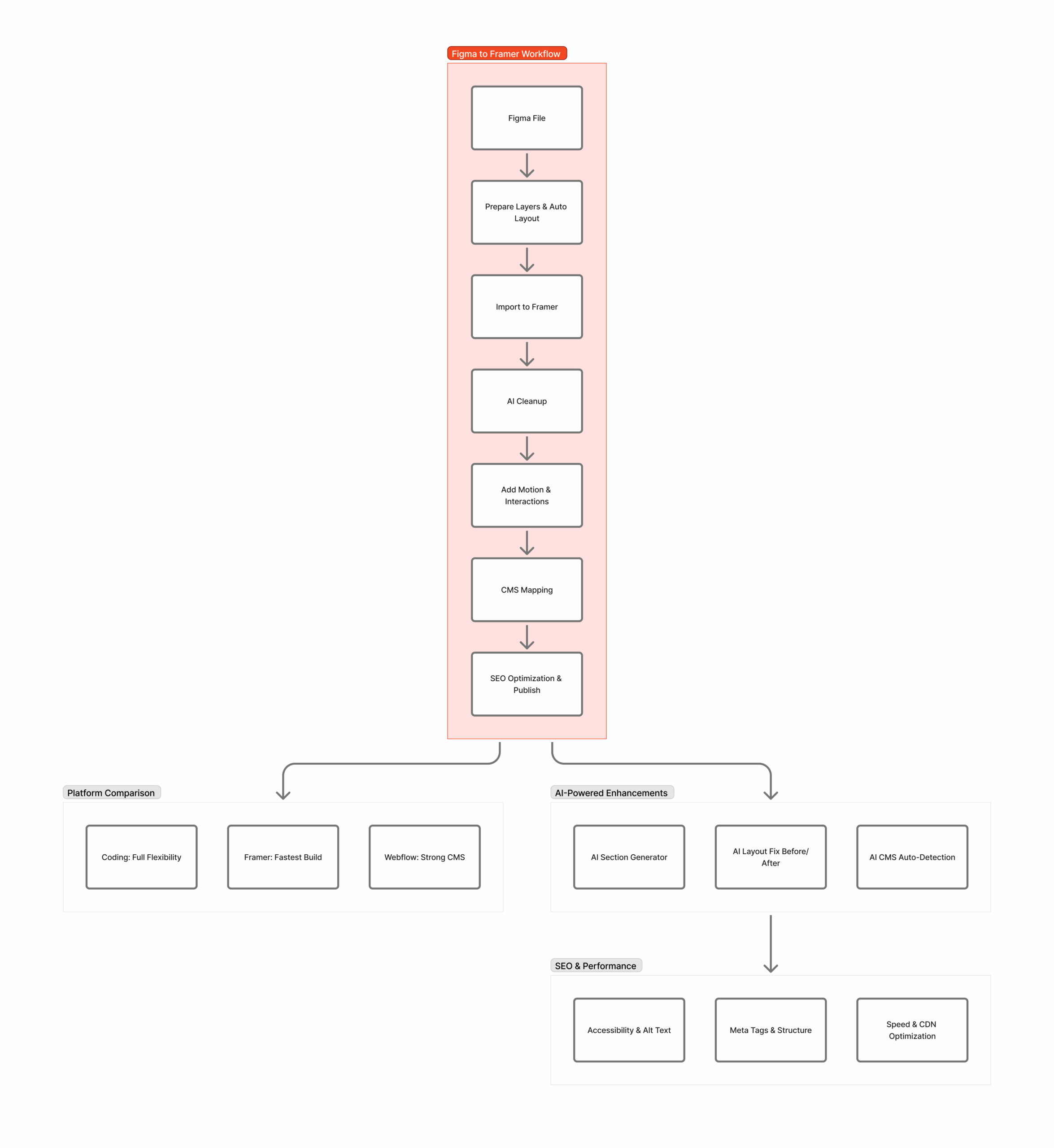
This optimized workflow is the most reliable way to move from mockup to live website in 2026. It ensures a clean import, perfect responsiveness, working interactions, and scalable CMS setups. Whether you work solo or in a team, this step-by-step guide helps you avoid common mistakes.
Step 1 — Prepare Your Figma File
Organize frames, components, auto-layout rules, variables, and typography tokens. Clean spacing, label groups, and ensure layers follow a predictable structure. This preparation dramatically improves the import accuracy inside Framer.
Step 2 — Import the File into Framer
Use Framer’s native Figma Import Tool. It reads layouts, converts components, pulls SVGs, and maps variables into tokens. Within seconds, the website begins to resemble the design file closely.
Step 3 — Use AI Cleanups and Component Scanning
After import, run Framer AI cleanup to fix spacing, rebuild responsive rules, and convert repeated blocks into components. This creates a smooth, scalable structure.
Step 4 — Add Interactions & Motion
Framer’s 2026 motion engine allows advanced animations, micro-interactions, scroll effects, and timeline-based transitions that match the Figma prototype or improve upon it.
Step 5 — Connect CMS & Dynamic Content
Turn design grids into blog lists, product cards, or portfolios using auto-detected CMS fields. AI can generate dummy entries and create dynamic templates instantly.
Step 6 — Publish & Optimize SEO
Framer’s SEO assistant now checks metadata, heading structure, alt text, and page speed. With everything fixed, publish the site instantly with built-in hosting and CDN.
Common Issues Designers Faced Before 2026—Now Solved
The Figma-to-Framer pipeline used to suffer from misaligned layouts, broken auto-layouts, missing interactions, and messy imports. In 2026, these problems are almost fully resolved thanks to new algorithms, improved component recognition, and AI assistance.
Broken Layouts → Now Stable Across Breakpoints
Missing Hover/State Variants → Now Automatically Detected
Messy Layer Structures → AI Cleanups in Seconds
All these improvements result in a drastically smoother workflow.
Who Benefits Most from the 2026 Figma to Framer Workflow?
The upgraded workflow is ideal for agencies, freelancers, product teams, branding studios, and startup founders who want beautiful websites without long development cycles. It saves time, reduces handoff miscommunications, and eliminates the need for complex coding stages.
This workflow particularly benefits:
- Branding & creative studios
- SaaS founders
- Web design agencies
- Freelance UI/UX designers
- Solo entrepreneurs
- Landing page specialists
Best Practices for Cleaner Figma-to-Framer Transfers
A refined workflow helps maintain design accuracy and reduces rework. Following these best practices ensures your imported site behaves exactly as expected inside Framer.
Keep Spacing Consistent
Use Auto Layout Everywhere
Avoid Random Groups — Use Frames Instead
Name Layers Clearly
Use Figma Variables for Colors & Spacing
Build with Resizing Logic in Mind
These habits produce nearly perfect imports every time.
Figma to Framer vs Figma to Webflow vs Coding (2026 Comparison)
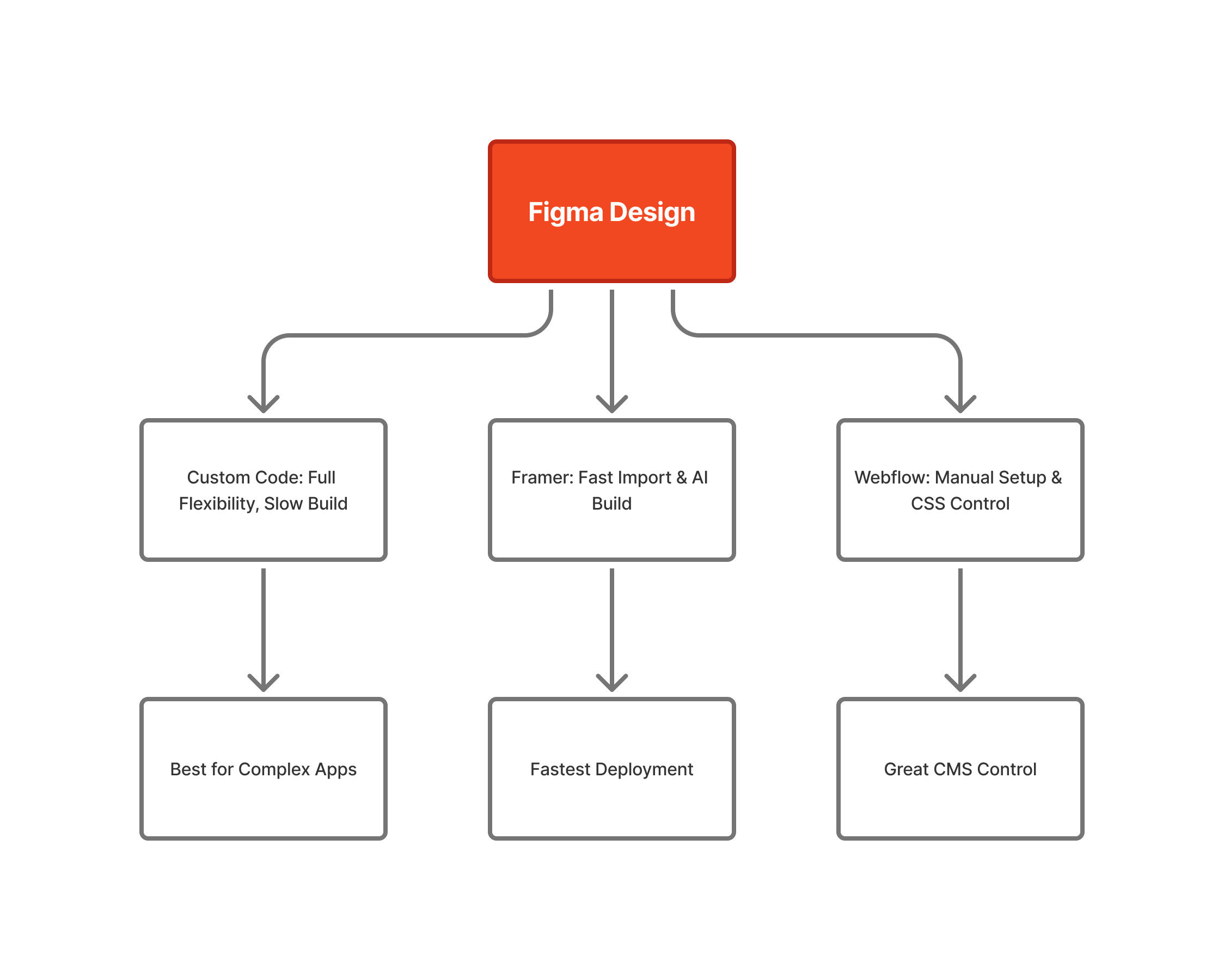
Choosing the right builder is essential for project speed and scalability. This comparison highlights the major differences between Framer, Webflow, and manual coding in 2026 and explains when each method is ideal.
Speed Comparison
Framer: Fastest
Webflow: Moderate
Coding: Slowest
Visual Accuracy
Framer: Best
Webflow: Good
Coding: Depends on developer
SEO Performance
Framer: Strong after 2026 updates
Webflow: Very strong
Coding: Excellent when optimised
Use Case Recommendation
- Choose Framer for rapid launches & design-heavy sites
- Choose Webflow for structured CMS-heavy websites
- Choose coding for fully custom apps
Final Thoughts — The Future of Figma to Framer in 2026 and Beyond
The 2026 workflow is faster, more automated, and more reliable than ever. With AI shaping the web creation process, Figma-to-Framer is poised to dominate design-to-web pipelines globally. Designers gain superpowers, developers get cleaner structures, and businesses enjoy quicker deployment cycles with exceptional visual quality.
The integration will only grow stronger as both platforms invest in advanced interoperability.
How XHTMLTEAM Helps You Build High-Quality Figma to Framer Websites

XHTMLTEAM specializes in turning Figma designs into flawless Framer websites with pixel-perfect accuracy, performance optimization, and SEO-ready structure. Our team handles:
- Full Figma-to-Framer conversion
- Responsive cleanup
- Component setup
- Motion & animation
- SEO optimization
- CMS mapping
- Fast turnarounds
- Unlimited revisions depending on plan
Whether you need a single landing page or a full multi-page website, XHTMLTEAM helps you launch faster with professional execution and high-quality standards.