
Figma to WordPress conversion is the foundation for building fast, scalable, and search-engine-friendly websites from modern UI/UX designs. A professional Figma to WordPress workflow focuses on clean HTML, structured content, and performance-oriented WordPress development that supports long-term SEO growth. XHTMLTEAM delivers agency-ready WordPress builds that turn Figma designs into reliable, maintainable websites.
Why Agencies Choose XHTMLTEAM for Figma to WordPress
Agencies require consistency, speed, and quality across multiple client projects. Figma to WordPress development at XHTMLTEAM is designed to support agency workflows, white-label delivery, and predictable results without relying on bloated tool
- Pixel-perfect Figma to WordPress conversion
- Clean HTML, CSS, and lightweight JavaScript
- Custom WordPress themes without bloated builders
- SEO-friendly structure aligned with Core Web Vitals
- White-label delivery for agencies worldwide
XHTMLTEAM Figma to WordPress Workflow
The Figma to WordPress process follows a structured approach that prioritizes SEO, performance, and maintainability from the first step.
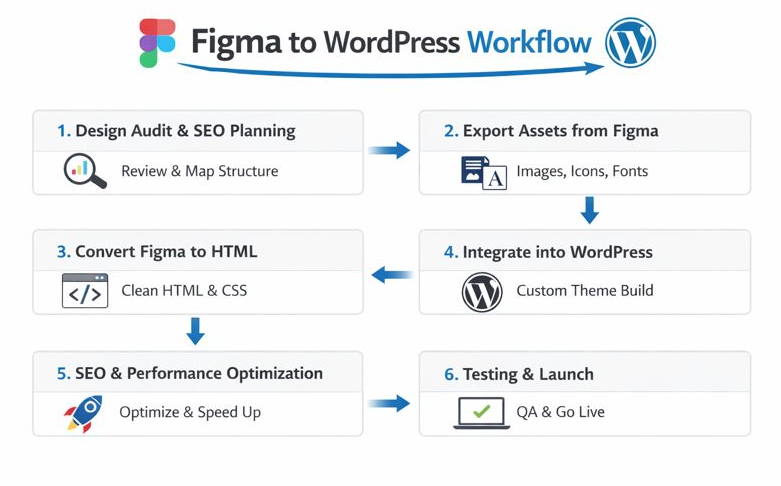
Design Audit & SEO Mapping
Every project starts with a detailed Figma review to align design, content structure, and SEO intent.
- Page hierarchy and heading strategy defined early
- UI components mapped to reusable WordPress templates
- SEO structure planned before coding begins
Exporting Assets from Figma
The first step in any Figma to WordPress project is preparing design assets properly.
- Identify all images, icons, fonts, and UI components.
- Export assets in optimized formats such as SVG for icons and WebP or PNG for images.
- Maintain a clear layer and naming structure in Figma to speed up development and avoid confusion.
- Prepare typography styles and spacing rules to ensure consistency in code.
A clean asset export process directly impacts performance and SEO.
Setting Up the WordPress Environment
Before coding begins, a solid WordPress foundation is essential.
- Set up WordPress on a reliable hosting platform optimized for speed and security.
- Decide whether to build a custom theme, child theme, or use a lightweight base framework.
- Configure essential settings such as permalinks, caching, and security.
- Install SEO-focused plugins like Rank Math or Yoast SEO only when necessary — never rely on plugins to fix poor code.
Converting Figma to HTML (Clean & Semantic)
This is the most critical phase of SEO-friendly Figma to WordPress development.
- Convert Figma designs into hand-coded HTML, CSS, and minimal JavaScript.
- Use semantic HTML elements (
header,nav,main,section,article,footer) for better accessibility and SEO. - Maintain proper heading hierarchy (H1 to H6) based on content structure, not visual size.
- Optimize CSS and JavaScript for performance, avoiding bloated frameworks.
- Ensure images include descriptive
altattributes for accessibility and image SEO.
Clean HTML is the backbone of search-engine-friendly WordPress websites.
Integrating HTML into WordPress
Once the HTML is ready, it’s integrated into WordPress properly.
- Convert static HTML into WordPress template files (
header.php,footer.php,single.php,page.php). - Use WordPress loops and functions to make content dynamic.
- Create custom post types and custom fields where needed.
- Follow WordPress coding standards to ensure compatibility and future updates.
- Keep templates lightweight to support fast page loading and Core Web Vitals.
Implementing SEO Best Practices
SEO is woven into every stage of the Figma to WordPress process.
- Use keyword-optimized titles, meta descriptions, and headings.
- Optimize internal linking and URL structure.
- Compress images and enable lazy loading.
- Ensure mobile-first performance and fast Largest Contentful Paint (LCP).
- Generate XML sitemaps and submit them via Google Search Console.
- Ensure schema markup compatibility for rich results.
Testing, Optimization, and Launch
Before launch, thorough testing ensures long-term SEO stability.
- Test responsiveness across devices and browsers.
- Validate HTML and CSS for errors.
- Run performance audits using PageSpeed Insights and Lighthouse.
- Fix layout shifts, unused CSS, and render-blocking resources.
- Monitor indexing, crawl errors, and performance after launch.
Custom Coding vs Page Builders (Agency Comparison)
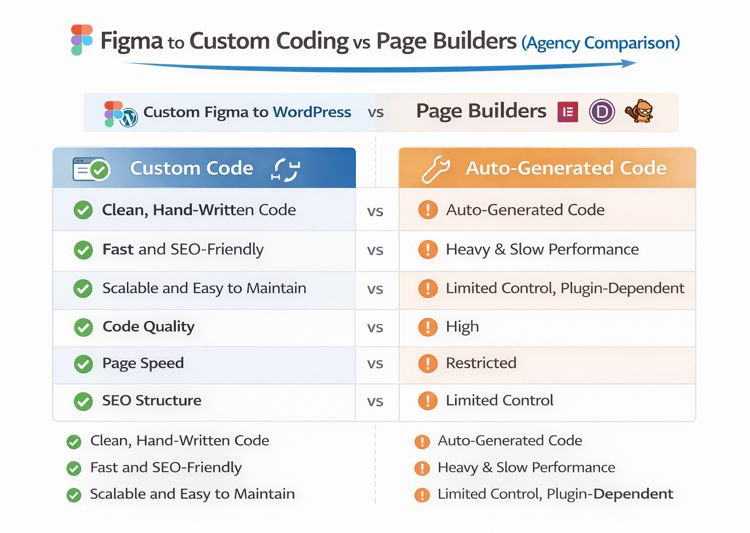
Development Approach Comparison
| Feature | Custom Figma to WordPress | Page Builders |
|---|---|---|
| Code Quality | Clean, human-written | Auto-generated |
| Page Speed | Fast and stable | Often heavy |
| SEO Structure | Fully controlled | Limited |
| Design Accuracy | Exact match | Compromised |
| Scalability | High | Restricted |
| Long-Term Maintenance | Easy | Plugin-dependent |
SEO & Performance Comparison
| Area | Custom Coding | Page Builders |
|---|---|---|
| Core Web Vitals | Optimized | Hard to control |
| HTML Semantics | Proper structure | Div-heavy |
| Crawl Efficiency | High | Lower |
| Plugin Dependency | Minimal | High |
| Hosting Flexibility | Full | Limited |
Agencies choose custom Figma to WordPress development when performance, SEO, and reliability drive client results.
Use Cases XHTMLTEAM Handles Daily
- Figma to WordPress custom themes
- Figma to HTML then WordPress integration
- Figma to Divi (cleaned and optimized)
- Figma to Elementor with reduced bloat
- White-label agency delivery
Ready to Deliver Better WordPress Builds to Your Clients?
A successful Figma to WordPress SEO-friendly coding process goes beyond design conversion. It combines clean HTML, performance optimization, structured content, and WordPress best practices to create websites that rank well and scale effortlessly. Whether converting Figma to HTML, Figma to WordPress, Figma to Divi, or Figma to Elementor, focusing on clean code and SEO from the start delivers faster, stronger, and more reliable results.
XHTMLTEAM helps agencies turn Figma designs into SEO-optimized WordPress websites using clean, maintainable code. No bloated builders. No shortcuts. Just reliable delivery that scales with your agency.
What agencies get:
- White-label Figma to WordPress development
- Predictable timelines and clear pricing
- Clean code that ranks and performs
- A team experienced with agency workflows
👉 Start your Figma to WordPress project today
👉 Partner with XHTMLTEAM and scale delivery with confidence
Frequently Asked Quetstions:
1. What makes XHTMLTEAM different from freelancers or page-builder services?
XHTMLTEAM focuses on clean, human-written code instead of auto-generated layouts. This improves SEO structure, performance, and long-term maintainability, which agencies depend on for repeat client work.
2. Do you build custom WordPress themes or use page builders?
Custom WordPress themes are preferred for performance and SEO. Page builders like Divi or Elementor are supported when required, with optimized setups that reduce unnecessary output.
3. Is white-label delivery available for agencies?
Yes. XHTMLTEAM works with agencies worldwide under white-label arrangements, delivering projects without branding and following agency workflows.
4. How SEO-friendly is your Figma to WordPress process?
SEO is handled at the code level through semantic HTML, structured headings, optimized assets, and performance-focused layouts.
5. Can you match Figma designs exactly?
Yes. Designs are converted with pixel accuracy while maintaining responsiveness across devices.
6. Do you support Core Web Vitals optimization?
Yes. Layout stability, fast loading, and responsive interaction are built into every WordPress theme.
7. What types of projects do agencies usually outsource?
- Figma to WordPress custom themes
- Figma to HTML with WordPress integration
- Marketing and SaaS websites
- Ongoing WordPress development support
8. How does pricing work for agencies?
Pricing stays transparent and predictable, with options for per-page pricing, full projects, or long-term partnerships.
9. Can you handle future updates and changes?
Yes. Clean WordPress themes allow easy updates by XHTMLTEAM or internal agency teams.
10. Work With XHTMLTEAM
XHTMLTEAM helps agencies turn Figma designs into SEO-optimized WordPress websites using clean, scalable code. The focus stays on performance, structure, and delivery reliability—so agencies can grow without technical bottlenecks.
11. Ready to start your Figma to WordPress project?
Partner with XHTMLTEAM and deliver better WordPress websites with confidence.