A Figma to WordPress project is often the next step after a website design is finalized in Figma. While a visually appealing design helps create a strong first impression, design alone does not guarantee search visibility, organic traffic, or conversions. The real value of a Figma to WordPress conversion comes from transforming that design into a fast, responsive, and SEO-friendly WordPress website that performs well across all devices.
Businesses investing in Figma to WordPress development are increasingly focused on more than just pixel-perfect implementation. They want websites that load quickly, achieve strong Core Web Vitals scores, support mobile-first indexing, and rank higher in Google Search and AI-powered search experiences. A professionally developed Figma to WordPress website combines design accuracy, clean code, responsive layouts, and technical SEO best practices to create a strong foundation for long-term online growth.
Google’s mobile-first indexing approach has changed how websites are evaluated. Search engines now focus heavily on mobile usability, page speed, accessibility, and user experience. As a result, a mobile-first Figma to WordPress workflow has become one of the most effective ways to build websites that support long-term SEO growth.
At XHTMLTEAM, every Figma to WordPress project is manually coded by experienced developers. Rather than relying on automated conversion tools that often generate bloated code, our team focuses on clean HTML, optimized CSS, lightweight JavaScript, and SEO-friendly WordPress development practices.
In this guide, you’ll learn how Figma to WordPress development works, why mobile-first coding matters, how it impacts search rankings, and what businesses should look for when choosing a Figma to WordPress development partner.
What Is Figma to WordPress?
Figma to WordPress is the process of converting a website design created in Figma into a fully functional WordPress website.
Figma allows designers to create page layouts, user interfaces, design systems, and interactive prototypes. However, these designs cannot function as websites on their own. Developers must transform those visual assets into working code and integrate them into WordPress.
A professional Figma to WordPress conversion involves much more than copying a design. Developers must carefully build:
- Responsive page layouts
- Mobile-friendly navigation
- Custom WordPress themes
- SEO-friendly HTML structure
- Optimized CSS and JavaScript
- Dynamic content areas
- Blog functionality
- Contact forms
- Performance optimizations
The goal is to create a website that matches the original design while maintaining flexibility, speed, and scalability.
Unlike website builders that rely heavily on drag-and-drop elements, a manually coded Figma to WordPress website gives developers greater control over performance and SEO.
This is one reason many agencies, startups, SaaS companies, and enterprise businesses choose custom Figma to WordPress development rather than relying entirely on automated tools.
Why Figma Has Become the Preferred Design Tool
Figma has become one of the most widely used design platforms because it allows teams to collaborate efficiently during the design process.
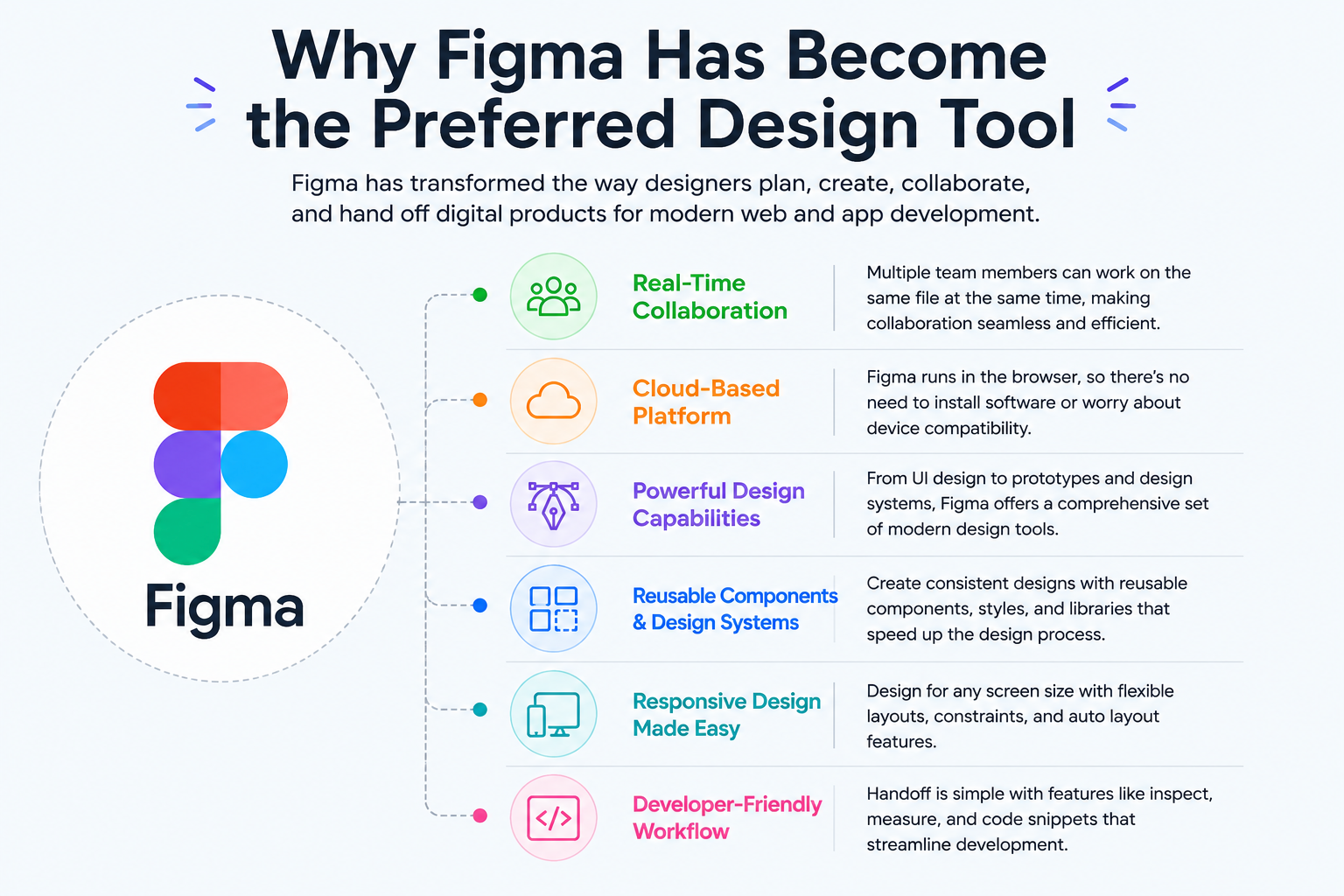
Designers can create:
- Landing pages
- Corporate websites
- SaaS dashboards
- Ecommerce interfaces
- Mobile app layouts
- Design systems
Once approved, these designs become the blueprint for a Figma to WordPress conversion project.
Because Figma supports responsive design planning from the beginning, it aligns naturally with modern WordPress development workflows.
Why Businesses Choose Figma to WordPress
Businesses invest in Figma to WordPress services because they want complete control over both design and functionality.
WordPress powers a significant portion of the web because it offers flexibility, scalability, and content management capabilities. Combining WordPress with custom Figma designs allows companies to create unique websites without the limitations of pre-built templates.
Custom Design Without Template Restrictions
Many WordPress themes force businesses to adapt their content to fit predefined layouts.
With Figma to WordPress development, the website is built around the design rather than forcing the design to fit a theme.
This approach allows businesses to create:
- Unique branding experiences
- Custom page layouts
- Specialized landing pages
- Industry-specific functionality
- Better user experiences
Better SEO Opportunities
Search visibility starts with website structure.
A manually coded Figma to WordPress website can be optimized for:
- Clean HTML markup
- Logical heading hierarchy
- Schema implementation
- Fast loading times
- Mobile responsiveness
- Accessibility standards
These technical factors contribute to stronger SEO performance.
For a deeper look at technical optimization, readers can explore Figma to WordPress SEO-Friendly Coding Process.
Greater Scalability
A website that supports business growth should be easy to expand.
Custom Figma to WordPress development makes it easier to:
- Add new landing pages
- Expand service sections
- Publish blog content
- Integrate third-party tools
- Improve functionality over time
This flexibility helps businesses avoid expensive redesigns later.
Why Figma to WordPress Mobile-First Development Important
Mobile devices account for a significant percentage of website traffic across most industries.
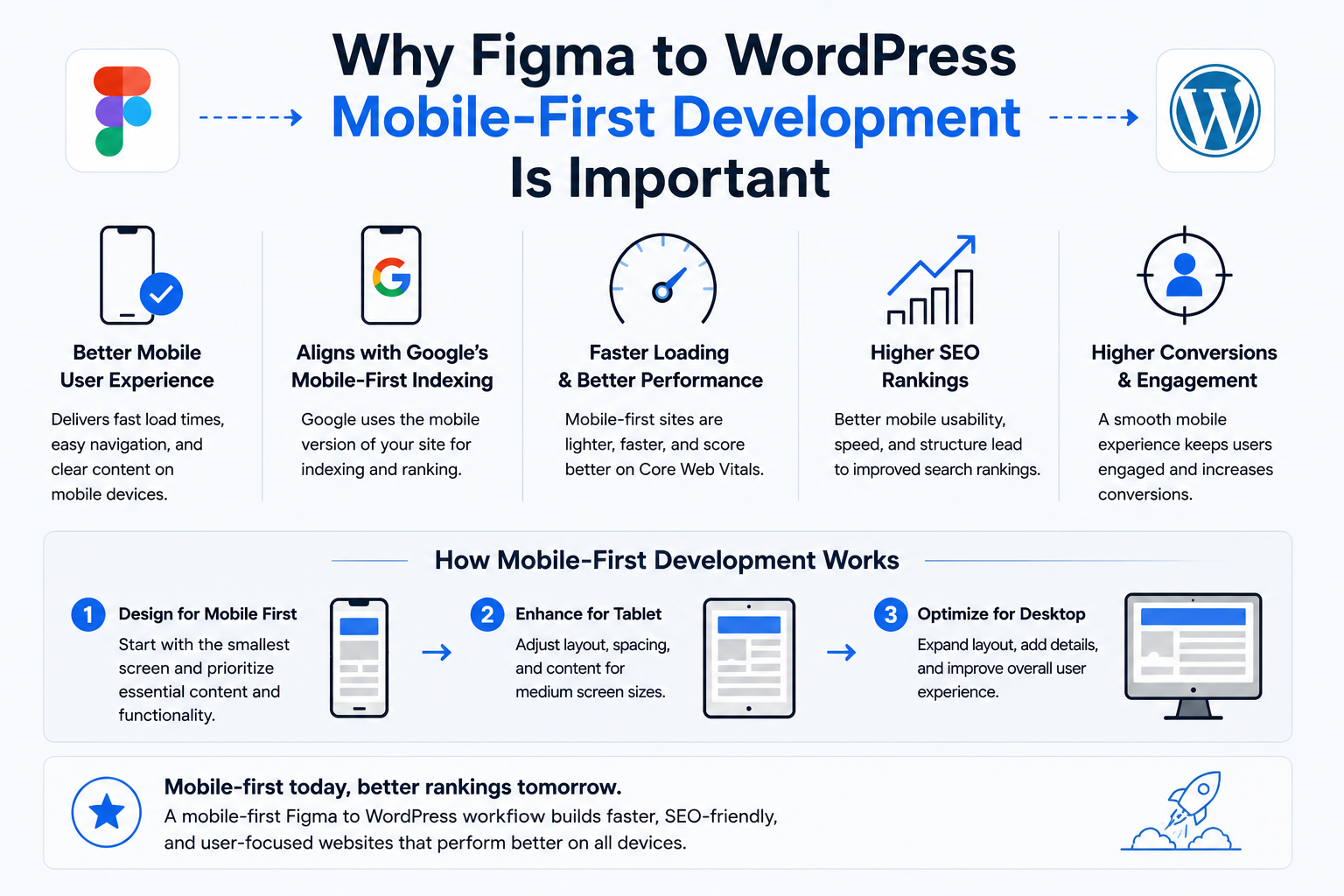
Because of this shift in user behavior, Google introduced mobile-first indexing. This means Google primarily evaluates the mobile version of a website when determining rankings.
For businesses investing in Figma to WordPress development, mobile-first coding is no longer optional.
Understanding Mobile-First Development
A mobile-first approach begins with designing and developing for smaller screens before expanding layouts for larger devices.
Instead of starting with desktop designs and attempting to shrink them for mobile users, developers prioritize mobile usability from the beginning.
This method helps create:
- Faster pages
- Cleaner layouts
- Better content hierarchy
- Improved navigation
- Enhanced accessibility
When a Figma to WordPress project follows mobile-first principles, users receive a better experience regardless of the device they use.
How Mobile-First Development Supports SEO
Search engines want to recommend websites that provide a positive user experience.
A mobile-first Figma to WordPress website often performs better because it focuses on:
- Speed
- Usability
- Readability
- Accessibility
- User engagement
These factors align closely with Google’s ranking objectives.
For example, if two websites contain similar content but one loads significantly faster on mobile devices, the faster website is more likely to deliver a better user experience.
Better Core Web Vitals Performance
Google uses Core Web Vitals to measure real-world website performance.
A mobile-first Figma to WordPress workflow helps improve:
Largest Contentful Paint (LCP)
Measures how quickly the main content becomes visible.
Interaction to Next Paint (INP)
Measures how responsive a page feels when users interact with buttons, forms, or menus.
Cumulative Layout Shift (CLS)
Measures visual stability and prevents unexpected content movement.
Improving these metrics helps create a better experience for visitors while strengthening SEO foundations.
Mobile-First Development Improves Conversion Rates
Search rankings are important, but conversions matter too.
Visitors expect websites to function smoothly on their smartphones.
A professionally developed Figma to WordPress website can improve:
- Lead generation
- Form submissions
- Product purchases
- Newsletter signups
- User engagement
When navigation is simple and content is easy to consume, users are more likely to take action.
Mobile-First Design Helps Future-Proof Websites
Screen sizes and browsing habits continue to evolve.
A mobile-first Figma to WordPress approach creates a flexible foundation that adapts more effectively to future devices and technologies.
Businesses that prioritize mobile usability today position themselves for stronger long-term growth and better search visibility in the future.
As Google Search, Google AI experiences, and other AI-powered search platforms continue to evolve, websites that emphasize performance, usability, and accessibility will have a significant advantage over competitors relying on outdated development methods.
Figma to WordPress Development Process
A successful Figma to WordPress project follows a structured development workflow. Every stage contributes to website performance, usability, maintainability, and search visibility.
Many businesses assume that converting a Figma design into WordPress simply involves recreating the design. In reality, a professional Figma to WordPress conversion requires careful planning, responsive coding, SEO implementation, accessibility testing, and performance optimization.
At XHTMLTEAM, each Figma to WordPress project is manually coded to ensure the final website is lightweight, scalable, and optimized for search engines.
Step 1: Analyze the Figma Design
Before writing a single line of code, developers review the Figma file in detail.
This stage helps identify:
- Page layouts
- Design systems
- Typography styles
- Spacing rules
- Interactive elements
- Mobile layouts
- Animation requirements
- Custom functionality
A detailed review prevents development issues later and ensures consistency throughout the website.
Developers also examine mobile screens carefully because mobile-first development begins long before coding starts.
Step 2: Create Semantic HTML Structure
Search engines rely on semantic HTML to understand content structure.
Instead of using generic containers everywhere, developers should use meaningful HTML elements whenever possible.
Example:
<header>
  <nav>
    <!-- Main Navigation -->
  </nav>
</header>

<main>
  <article>
    <h1>Figma to WordPress Services</h1>
    <section>
      <h2>Why Choose Our Team</h2>
      <p>Content goes here...</p>
    </section>
  </article>
</main>

<footer> Copyright Information </footer>
Semantic HTML provides several benefits:
- Better accessibility
- Improved crawlability
- Cleaner code
- Easier maintenance
- Stronger SEO signals
This is one reason manually coded Figma to WordPress websites often outperform websites generated by automated tools.
Step 3: Build Mobile-First CSS
After creating the HTML structure, developers build responsive styles using a mobile-first approach.
Mobile-first CSS starts with small-screen layouts and progressively enhances the design for larger screens.
Example:
.hero-section {
  padding: 20px 15px;
}
.hero-title {
  font-size: 30px;
  line-height: 1.3;
}
@media (min-width: 768px) {
  .hero-section {
    padding: 70px 30px;
  }
  .hero-title {
    font-size: 54px;
  }
}
Benefits of mobile-first CSS include:
- Faster rendering
- Smaller CSS files
- Improved maintainability
- Better mobile usability
- Enhanced SEO performance
Step 4: Convert HTML Into WordPress
Once the front-end templates are complete, developers integrate them into WordPress.
Depending on project requirements, this may involve:
- Custom WordPress themes
- Gutenberg development
- Advanced Custom Fields (ACF)
- Divi integration
- Elementor integration
- Custom post types
- Dynamic templates
The goal is to make content management simple while preserving design accuracy.
Businesses looking for custom WordPress development often benefit from reading the Figma to WordPress Conversion Guide for 2026, which explains various development approaches in greater detail.
Step 5: Optimize for SEO
SEO should be integrated during development rather than added after launch.
A professional Figma to WordPress workflow includes:
- SEO-friendly URLs
- Heading hierarchy
- Internal linking
- Optimized images
- Structured content
- Mobile responsiveness
- Fast page speed
Technical SEO improvements implemented during development typically deliver better long-term results than attempting to fix issues later.
Figma to WordPress Responsive Coding Best Practices
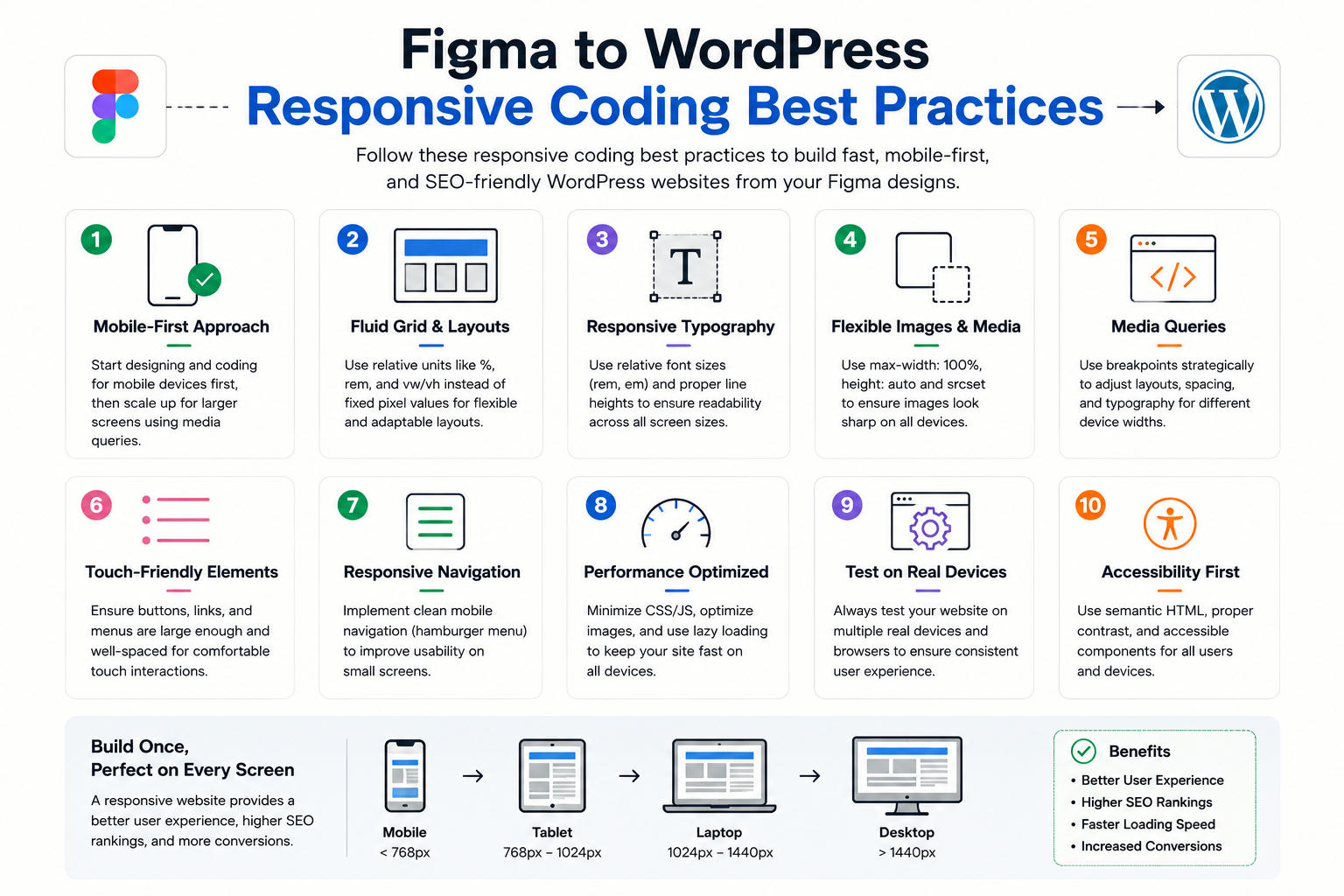
Responsive design is a core component of modern Figma to WordPress development.
Users access websites using a wide range of devices, including smartphones, tablets, laptops, and large desktop monitors.
A responsive website automatically adapts to different screen sizes while maintaining usability and visual consistency.
Flexible Grid Systems
Modern Figma to WordPress projects often use CSS Grid and Flexbox to create responsive layouts.
Example:
.services-grid {
  display: grid;
  grid-template-columns: 1fr;
  gap: 20px;
}

@media (min-width: 768px) {
  .services-grid {
    grid-template-columns: repeat(2, 1fr);
  }
}

@media (min-width: 1200px) {
  .services-grid {
    grid-template-columns: repeat(4, 1fr);
  }
}
This approach creates flexible layouts that adjust naturally as screen sizes change.
Responsive Typography
Typography should scale appropriately across devices.
Large desktop fonts often become difficult to read on smaller screens if not optimized properly.
Mobile-first Figma to WordPress development prioritizes readability and accessibility while maintaining visual consistency.
Figma to WordPress Theme Structure for Scalability
A well-organized theme structure helps maintain performance and simplifies future updates.
Example theme structure:
theme-folder/

├── style.css
├── functions.php
├── header.php
├── footer.php
├── page.php
├── single.php
├── archive.php
├── index.php │
├── assets/
	├── css/
	├── js/
	└── images/
	└── template-parts/
A clean structure helps developers:
- Maintain code quality
- Improve loading speed
- Reduce technical debt
- Support SEO improvements
Professional Figma to WordPress development should always prioritize long-term maintainability.
Figma to WordPress Core Web Vitals Optimization
Core Web Vitals remain one of the most important performance metrics for modern websites.
Google uses these metrics to evaluate user experience.
Largest Contentful Paint (LCP)
LCP measures how quickly the main visible content loads.
To improve LCP during a Figma to WordPress project:
- Compress images
- Use modern image formats
- Reduce render-blocking CSS
- Optimize font loading
- Use efficient hosting
Interaction to Next Paint (INP)
INP measures responsiveness.
Improvement strategies include:
- Minimizing JavaScript
- Deferring non-essential scripts
- Reducing third-party dependencies
- Optimizing event handlers
Cumulative Layout Shift (CLS)
CLS measures visual stability.
Developers can reduce CLS by:
- Defining image dimensions
- Reserving space for dynamic content
- Avoiding unexpected layout changes
- Loading fonts efficiently
These optimizations create a better experience for users and improve technical SEO.
Figma to WordPress Image Optimization Best Practices
Images often account for the largest percentage of page weight.
Poor image optimization can negatively impact page speed and search visibility.
A professional Figma to WordPress workflow includes:
Using WebP Images
WebP images typically offer better compression than traditional JPEG and PNG formats.
Benefits include:
- Smaller file sizes
- Faster loading
- Improved performance
Responsive Images
Different devices should receive appropriately sized images.
Responsive image techniques help reduce unnecessary bandwidth usage.
Lazy Loading
Lazy loading delays image downloads until users scroll near them.
This improves:
- Initial page speed
- User experience
- Performance metrics
SEO-Friendly Alt Text
Alt text provides additional context for search engines and screen readers.
Example:
Good Alt Text
“Figma to WordPress mobile-first website development”
Poor Alt Text
“image123”
Proper alt text supports both accessibility and SEO goals.
Figma to WordPress Accessibility Best Practices
Accessibility improves usability for all visitors and aligns with modern SEO expectations.
Search engines increasingly favor websites that provide inclusive experiences.
Proper Heading Structure
Every page should follow a logical hierarchy.
Example:
<h1>Figma to WordPress Services</h1>
<h2>Benefits</h2>
<h3>Mobile-First Development</h3>
<h3>SEO Optimization</h3>
Keyboard Accessibility
Users should be able to navigate websites without relying solely on a mouse.
Color Contrast
Text should remain readable across all devices and viewing conditions.
Accessible Forms
Forms should include:
- Labels
- Error messages
- Clear instructions
- Keyboard support
Accessibility improvements often lead to better user engagement, which indirectly supports SEO performance.
Manual Figma to WordPress vs Automated Conversion Tools
Businesses evaluating a Figma to WordPress project often compare manual development with automated conversion tools. While automated platforms can generate a website quickly, the quality of the output varies significantly.
The primary goal of a professional Figma to WordPress conversion should be creating a website that is fast, scalable, SEO-friendly, and easy to maintain. This is where manual development often provides a substantial advantage.
| Feature | Manual Figma to WordPress | Automated Conversion Tools |
| Code Quality | Clean and optimized | Often bloated |
| SEO Control | Excellent | Limited |
| Core Web Vitals | Easier to optimize | Can be challenging |
| Accessibility | Better implementation | Often inconsistent |
| Mobile Optimization | Fully customizable | Depends on generated code |
| Scalability | Excellent | May require rebuilding later |
| Custom Functionality | Unlimited | Often restricted |
| Maintenance | Easier long-term | Can become complex |
Automated tools can be useful for rapid prototyping, but businesses that rely on organic traffic generally benefit from professionally coded Figma to WordPress development.
A manually coded website allows developers to optimize every element for performance, SEO, accessibility, and future growth.
Common Figma to WordPress Mistakes That Hurt SEO
Many websites struggle to rank not because of poor content but because of development mistakes introduced during the Figma to WordPress conversion process.
Understanding these issues can help businesses avoid costly SEO problems.
Ignoring Mobile-First Development
Some development teams still prioritize desktop layouts and treat mobile optimization as an afterthought.
This approach often creates:
- Slow mobile pages
- Poor usability
- Layout issues
- Lower engagement rates
Since Google primarily evaluates mobile experiences, this mistake can significantly impact rankings.
Using Bloated Themes and Plugins
Adding numerous plugins and large themes may speed up initial development, but it often creates long-term performance problems.
Excessive plugins can lead to:
- Slow loading pages
- Increased server requests
- Security concerns
- Maintenance challenges
Professional Figma to WordPress development should focus on efficiency rather than relying heavily on third-party tools.
Poor Heading Structure
Heading tags help search engines understand content hierarchy.
Common mistakes include:
- Multiple H1 tags
- Missing H2 sections
- Inconsistent heading levels
- Using headings purely for styling
A logical structure improves both user experience and SEO.
Unoptimized Images
Large images remain one of the most common causes of slow websites.
Every Figma to WordPress project should include:
- Image compression
- WebP support
- Responsive image delivery
- Descriptive alt text
Ignoring Accessibility
Accessibility issues often affect both users and search engines.
Missing labels, poor contrast, and keyboard navigation problems can reduce usability and negatively affect engagement.
Relying Entirely on Automated Converters
Automated converters can save time initially, but many produce excessive markup and unnecessary code.
This often results in:
- Lower performance scores
- Larger page sizes
- Difficult maintenance
- Reduced SEO flexibility
Businesses seeking long-term search visibility should carefully evaluate the trade-offs before choosing automated solutions.
Why XHTMLTEAM Uses Manual Figma to WordPress Coding
At XHTMLTEAM, we believe that high-quality websites start with high-quality code.
Every Figma to WordPress project is manually developed by experienced developers who focus on performance, usability, and SEO from the beginning.
Manual coding provides greater control over:
- Semantic HTML structure
- Mobile-first CSS architecture
- Page speed optimization
- Accessibility implementation
- Technical SEO
- WordPress performance
Rather than relying on automated code generation, our team carefully converts every design into a production-ready WordPress website.
This approach helps ensure:
- Cleaner source code
- Better Core Web Vitals
- Faster loading times
- Improved crawlability
- Greater scalability
Businesses that prioritize search visibility often choose manual Figma to WordPress development because it creates a stronger foundation for long-term growth.
For additional insights, explore:
- Figma to WordPress SEO-Friendly Coding Process
- Figma to WordPress Conversion Guide for 2026
- Why Outsource Figma to WordPress Conversion
- Figma to Divi Pixel-Perfect WordPress Builds
- Framer to WordPress Migration
- Figma to Divi WordPress Development
Figma to WordPress Case Study Example
A digital marketing agency approached XHTMLTEAM with a multi-page Figma design for a service-based business.
The design was visually appealing but included large media assets, multiple interactive sections, and complex layouts.
Our development team performed a manual Figma to WordPress conversion using a mobile-first workflow.
The project included:
- Custom WordPress theme development
- Semantic HTML implementation
- Responsive CSS architecture
- Image optimization
- Accessibility improvements
- Performance optimization
After launch, the website delivered:
- Faster page loading
- Improved mobile usability
- Better Core Web Vitals scores
- Stronger user engagement
- Increased organic visibility
While every project produces different results, this example highlights how development quality directly influences SEO performance.
Frequently Asked Questions About Figma to WordPress
How long does a Figma to WordPress conversion take?
Project timelines depend on design complexity, page count, functionality requirements, and content readiness. A simple Figma to WordPress project may take only a few days, while larger websites can require several weeks.
Is Figma to WordPress good for SEO?
Yes. A professionally developed Figma to WordPress website can provide excellent SEO performance when built using clean code, semantic HTML, mobile-first design principles, and performance optimization techniques.
Can you convert Figma designs into custom WordPress themes?
Absolutely. Many businesses choose custom Figma to WordPress development because it provides greater flexibility, better performance, and complete control over design implementation.
What is the difference between Figma to WordPress and Figma to Divi?
A traditional Figma to WordPress project typically involves custom theme development. A Figma to Divi project uses the Divi Builder framework to recreate the design while leveraging Divi’s visual editing capabilities.
Why is manual Figma to WordPress development better?
Manual development provides greater control over code quality, SEO, accessibility, performance, and scalability. It often produces cleaner websites than automated conversion tools.
Does mobile-first development improve Google rankings?
Mobile-first development supports many ranking factors, including usability, page speed, accessibility, and Core Web Vitals. While no single factor guarantees rankings, mobile-first development contributes to a stronger SEO foundation.
Can XHTMLTEAM convert complex Figma designs to WordPress?
Yes. XHTMLTEAM specializes in manually converting complex Figma designs into responsive, SEO-friendly WordPress websites.
Will my Figma to WordPress website be responsive?
A professionally developed Figma to WordPress website should be fully responsive and optimized for smartphones, tablets, laptops, and desktop devices.
How much does a Figma to WordPress project cost?
Pricing depends on factors such as page count, design complexity, functionality requirements, CMS customization, and development timeline.
Can you optimize an existing Figma to WordPress website?
Yes. Existing WordPress websites can often be improved through performance optimization, code cleanup, accessibility enhancements, mobile usability improvements, and SEO refinements.
Why Google AI and Search Engines Prefer High-Quality Figma to WordPress Websites
Google’s AI-powered search experiences focus on delivering the most useful and trustworthy answers to users.
Websites that perform well in both traditional search and AI-generated results typically demonstrate:
- Strong expertise
- Technical accuracy
- Helpful content
- Fast loading speeds
- Excellent user experience
- Mobile usability
- Accessibility compliance
A professionally developed Figma to WordPress website supports these goals through clean code, structured content, responsive design, and SEO best practices.
As AI-powered search continues to evolve, websites that prioritize quality and user experience are more likely to remain competitive.
Conclusion
A successful Figma to WordPress project involves much more than converting a design into a working website. Businesses that want stronger search visibility must also focus on mobile-first development, technical SEO, Core Web Vitals, accessibility, and performance optimization.
Manual Figma to WordPress development provides greater control over these critical factors than most automated conversion tools. By prioritizing clean code, responsive design, and SEO-friendly development practices, businesses can create WordPress websites that support long-term growth and attract more qualified traffic.
Looking for a reliable Figma to WordPress development partner?
XHTMLTEAM manually converts Figma designs into fast, responsive, SEO-friendly WordPress websites. Every project is coded by experienced developers to ensure pixel-perfect accuracy, mobile-first performance, clean code, and strong search visibility. Whether you need a custom WordPress theme, a Divi-based implementation, or a performance-focused website migration, our team can help transform your Figma design into a production-ready WordPress website.